Skip to how it works

Construction operating system · Public beta

Post it.Bid it.Build it.Sign it off.

NEXUS is where owners post renovation and construction work, general contractors and subcontractors bid on it, and every approval lands on one shared record. AI drafts the numbers. People make the calls.

01Free to post
02Free to bid in your area
03AI modules from $29/mo
04NY · NJ · CT · N. Virginia
A-101 · How it works
How it works

Who does what. When.

Five steps, four lanes. Pick your role to see your part.

Everyone01PostFreeBid board02Price & bidFree to bid in your areaAI Takeoffs · Estimating AI03AwardPeople decideAgreement · milestones04BuildProgress Tracking · app05ApprovePeople decideProgress + Payments↺Show the workMarketing AI
OwnerPosts scope, drawings and budgetGets an optional budget estimateDecisionPicks the contractor and signsFollows progress from anywhereDecisionApproves the milestone — the payment record updatesLeaves a review
General contractorFinds the job on the boardBids the whole jobDecisionSigns with the owner and awards trade scopesRuns the site and logs progressDecisionChecks sub work and submits to the ownerTurns the record into a portfolio
SubcontractorFinds work in their tradeBids only their tradeSigns their scope with the GCBuilds and logs photos from the phoneSubmits evidence for their scopeBuilds a track record
NEXUS AIReads the drawingsDrafts the takeoff and estimateLines up the bids and flags gapsFlags schedule riskChecks evidence against the scopeDrafts the case study
  1. 01PostFreeBid board
    Owner
    Posts scope, drawings and budget
  2. 02Price & bidFree to bid in your areaAI Takeoffs · Estimating AI
    General contractor
    Bids the whole job
    Subcontractor
    Bids only their trade
  3. 03AwardPeople decideAgreement · milestones
    Owner
    DecisionPicks the contractor and signs
    General contractor
    DecisionSigns with the owner and awards trade scopes
  4. 04BuildProgress Tracking · app
    General contractor
    Runs the site and logs progress
    Subcontractor
    Builds and logs photos from the phone
  5. 05ApprovePeople decideProgress + Payments
    Owner
    DecisionApproves the milestone — the payment record updates
    Subcontractor
    Submits evidence for their scope
  6. ↺Show the workMarketing AI
    General contractor
    Turns the record into a portfolio
A person decides hereWho holds the jobThe GC brings in subsDrafts only — never decidesSee each step in detail
Supply materials? Join as a vendor

Post the work. Keep the final say.

  • Post projects free and compare bids on the same scope
  • See field progress without chasing updates
  • Approve every milestone yourself
Post a project

Win whole jobs. Run them on one record.

  • Find open projects that are ready to bid
  • Draft takeoffs and estimates with AI, then check them
  • Bring your subs onto the same record
Bid as a GC

Bid your trade. Show your work.

  • Bid only the trades you cover, in your service area
  • Log photos and progress from your phone
  • Follow milestone approvals as they happen
Join as a sub
A-102 · Step by step

One project, start to sign-off.

Follow a sample project through NEXUS. Each step shows who acts, what AI prepares, and the record you keep.

Illustrative example · sample data
Step 1 / 5 · Post

Post the project

Describe the scope, upload the drawings, set a budget and the trades you need. Publish it to the public bid board, or invite contractors you already trust.

Who actsOwner
WorkspaceNone — free
You keepScope + plan set
Bid boardSample
Park Slope Brownstone — Kitchen & Living
Brooklyn, NYDemoTileMillwork
$180–220KOpen for bids

On the recordCompany profileProject discovery

Step 2 / 5 · Price & bid

Price it. Bid it.

Contractors in the service area find the job and bid — GCs on the whole job, subs on their trade. NEXUS AI reads the plan set into quantities and drafts an estimate, with every assumption shown.

Who actsGCs and subs
WorkspaceAI Takeoffs · Estimating AI
You keepReviewed quantities + bids

Human checkpointAn estimator checks every AI quantity before it is used.

Takeoff · AI draftSample
Engineered oak flooring285SF
Porcelain tile — kitchen230SF
Drywall — walls & ceiling1,240SF
Base cabinets18LF
$191K Draft estimate
Review required

On the recordBlueprint takeoffAI estimation

Step 3 / 5 · Award

Compare. Award. Sign.

NEXUS lines every bid up against the same scope and flags what does not add up. The owner chooses the contractor and signs in NEXUS, with the milestones the work will follow. The GC then awards each trade scope to a sub.

Who actsOwner decides · GC awards trade scopes
WorkspaceNone — people decide
You keepSigned agreement + milestones

Human checkpointOnly the owner or GC awards the job. AI never does.

Bids · same scopeSample
Cortez Build$186KComplete scope
Meridian GC$204KNo appliance allowance line
Apex Interiors$139KFlagged — Flooring 30% under the takeoff
AgreementCortez Build
M1Demo & rough-inM2Drywall & paintM3Kitchen installM4Finishes & punch list
J. OrtizR. CortezSigned · owner + GC

On the recordBid comparisonAgreements

Step 4 / 5 · Build

Build it on the record.

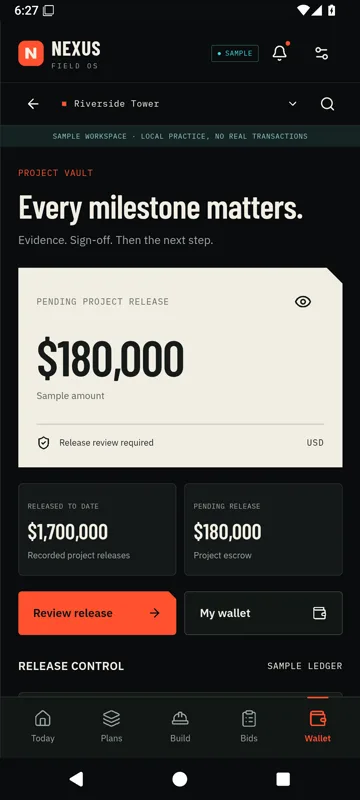
Schedules, daily logs, site photos, RFIs and change orders stay attached to the milestone they belong to — captured on site with the NEXUS app, so the office sees what the field sees.
Who actsGC and subs, on site
WorkspaceProgress Tracking · mobile app
You keepSchedule + field evidence
Capture it on site with the NEXUS app
Field recordSample
Kitchen tile setDaily log
12 photos
Island outlet locationRFI #4
Answered
Under-cabinet lighting addedChange order
In review
Capture it on site with the NEXUS app

On the recordField recordsMobile app

Step 5 / 5 · Approve

Sign off each milestone.

Subs submit evidence to the GC, the GC submits the milestone, and NEXUS AI checks it against the scope. Only the owner’s sign-off moves the payment record — AI never releases money.

Who actsContractor submits · Owner signs off
WorkspaceProgress + Payments
You keepApproval history + payment record

Human checkpointAn authorized person signs off every milestone.

Milestone 3 · Kitchen installSample
16 photos · 2 documentsAI review: 1 note to check
Owner sign-off required
Approved · payment record updated

On the recordMilestone paymentsProject sign-offs

Then the work speaks for you.

The finished, signed-off record becomes your public profile and project gallery — proof that wins the next job. And the path starts again.

WorkspaceMarketing AICompany profileProject galleryReviews

Back to the map
A-201 · The bid board
The bid board

Open work, out to bid.

Loading published projects…

Sample activity
  • Project posted · Hoboken loft renovation · $240–290K
  • AI takeoff draft ready · quantities still need review
  • New bid · Cortez Build · $186K · whole job
  • Trade bid · Okafor Electric · electrical scope
  • Agreement signed · Park Slope Brownstone · 4 milestones
  • Daily log · Kitchen tile set · 12 photos
  • Milestone 3 approved by owner · payment record updated
A-301 · NEXUS AI
NEXUS AI

AI drafts. People decide.

NEXUS AI reads drawings, prices scope, compares bids and checks field evidence — then hands its work to a person.

  • Never awards a job.
  • Never releases money.
  • Shows every assumption.
Open NEXUS AI Chat
Illustrative workflow · sample data
NEXUS AI assistant
Is Apex Interiors' bid realistic for this scope?
NEXUS AIApex is 27% below the takeoff estimate. Their flooring line covers about 200 SF against 285 SF in the plan set. I'd ask them to clarify before you award.
Answers stay on your project — advisory only, you decide.
A-401 · Modules & pricing
Modules & pricing

Free to post and bid.Add AI by the step.

Posting projects is free, and so is bidding in your service area. Each AI workspace plugs into a step of the project, with a 14-day trial and no long-term contract.

Complete Package

All five AI workspaces on one subscription.

14-day trial · cancel anytime

$149/mo · Save $56/mo

Prices in USD; taxes may apply. Milestone payment fees, if any, are shown before any payment is processed. Workspaces depend on your account role.

Full pricing details How NEXUS works
General notes

The rulebook every project runs on.

  1. 1.

    AI never decides.

    It drafts takeoffs, estimates and comparisons. Awards and payment releases need an authorized person.

  2. 2.

    One shared record.

    Bids, milestones and approvals live on one record that every party on the job can see.

  3. 3.

    Sign-off on every milestone.

    Each milestone is reviewed and approved by an authorized person before its payment record moves.

  4. 4.

    Honest about beta.

    Sample data is labelled. In-app credits are not bank dollars; real settlement runs only through a separately verified payment provider.

A-501 · Field notes
Field notes

Field notes from the job.

Source-grounded guides for estimating, bid review, field evidence, milestone controls and payment records.

All insights

Questions

Answers about NEXUS

Still unsure?Book a demo Ask NEXUS AI

What is NEXUS?

NEXUS is beta construction operations software from NEXUS Platform Inc. The public site includes a bid board, AI-assisted takeoff and estimating drafts, bid comparison, progress records, milestone payment records, and marketing drafts. AI output is advisory and a qualified person still reviews it.

How much do the AI modules cost?

Marketing AI is $29/month, Progress Tracking is $29/month, AI Takeoffs is $39/month, Estimating AI is $49/month, Progress + Payments is $59/month. All five modules are $149/month. Posting a project and bidding on the public board do not require a module. Module checkout includes a 14-day trial.

Where does NEXUS serve?

NEXUS serves construction teams in New York, New Jersey, Connecticut, and Northern Virginia.

Can AI award a bid or release a payment?

No. AI can prepare drafts, comparisons, and advisory flags. An authorized person decides awards, approvals, and payment releases. An in-app credit or ledger balance is not a bank balance.

Put your next project on the record.

Posting is free, and so is bidding in your service area. Add an AI workspace when you need one.